x

Subscribe to GwArez !


Pages

Whatever you need!!! We bring it!!!
Showing posts with label bsnl. Show all posts

Saturday, June 11, 2011

Beginner's Guide to BSNL


How to check your BSNL broadband usage details

http://www.indiabroadband.net/bsnl-b...e-details.html (How to check your BSNL broadband usage details)

Beginner's Guide for BSNL

http://www.indiabroadband.net/bsnl-b...uide-bsnl.html (Beginner's Guide for BSNL)

Beginner's Guide for BSNL Plan Selection

http://www.indiabroadband.net/bsnl-b...selection.html (Beginner's Guide for BSNL Plan Selection)

Beginner's Guide - Modem selection and troubleshoot

http://www.indiabroadband.net/bsnl-b...ubleshoot.html (Beginner's Guide - Modem selection and troubleshoot)

BSNL - Layman's Review

http://www.indiabroadband.net/bsnl-b...ns-review.html (BSNL - Layman's Review)

BSNL Rural Plans - Layman's Review

http://www.indiabroadband.net/bsnl-b...ns-review.html (BSNL Rural Plans - Layman's Review)

BSNL Unlimited Plans - Layman's review

http://www.indiabroadband.net/bsnl-b...ns-review.html (BSNL Unlimited Plans - Layman's review)

BSNL Night Unlimited - Layman's review

http://www.indiabroadband.net/bsnl-b...ns-review.html (BSNL Night Unlimited - Layman's review)

Precautions during plan change

http://www.indiabroadband.net/bsnl-b...an-change.html (Precautions during plan change)

Plan change confirmation

http://www.indiabroadband.net/bsnl-b...firmation.html (Plan change confirmation)

Saturday, May 21, 2011

BSNL Broadband Hack : Limited Plan Users can Download Unlimited for Free

It may work or wont work...This is a article from net... I dint try yet... Try it with your Own Risk

Please follow steps given below or you can download detailed tutorial from this link
Logon to this link http://www.your-freedom.net  and create a free account. Activate your account from your email. To activate, just click the activation link given to you on the e-mail you have registered.

Photobucket


Under download tab of the same site download the "Your Freedom Client" It must be "Windows full installer" --12 MB). You can click on any of the servers given there. But just be sure you select your right operating system.  First Just download the client, right now don’t install it. We will install it later.

Photobucket

Download Java latest version from this link.

Photobucket

It is an online installer. So let it be downloaded and then install java. Java is very necessary for this hack. So be sure that Java is properly installed to the latest version.

Photobucket


Install “Your  Freedom Client” with the default settings. ( Java should be installed first and then Your  Freedom otherwise it will show an error). Then Then connect to internet using BSNL Broadband.


Start Your Freedom. It will ask for language. Select “English (US)”.

Photobucket

Then it will show a Welcome screen which starts a wizard to set up “Your Freedom Client” so that we can hack BSNL Broadband to an unlimited plan. Cancel the wizard.

Photobucket

You will see a Your Freedom Open window. Click on “Configure

Photobucket


Go to “Account Information" tab. Enter your “Your Freedom” Username and Password correctly. (which we created in step 1)

Photobucket

Then go to the “Server Connection” tab. Select “Connection Mode” as “UDP”. Then click on the "Wizard".

Photobucket

 In the wizard, click next. Then it will search for Freedom Servers which can be used to hack BSNL Broadband.

Photobucket


When the search completes, it will show many servers which can be used for proxy tunneling. Choosing the first server is recommended.  The first server (for example "ems17.your-freedom.de") has the maximum priority. Then click on “Finish”. Then click on “Save and Exit”.

Then right click on the Your Freedom Icon (the closed door) on the Notification Area and click on “Start Connection”. Your proxy connection will be started.

Now one last setting for Internet Explorer which is necessary to make.

Photobucket

In Internet Explorer Menu Bar go to Tools  >> Internet Options >> Connections Tab >> LAN Settings. Set proxy address as "localhost" (without ") and port 8080. You need to configure the same even if you are using any other browser. Press OK and Start Browsing.. But remember, every time you start your computer, Start Freedom Connection from Notification area and then only start the internet. Otherwise the bytes will be counted.

Your Free Internet Starts!!!!!! Enjoy!!! After using this trick, go to BSNL bill details and Check your Usage. You will be surprised to know that you have browsed for free and converted your 1 GB limited plan of Rs. 250 to an unlimited plan with the same 2 mbps speed. With this trick your bill will not increase than normal. So enjoy hacking!!!

Bsnl Xp users hack Bandwidth increase


Here’s a simple 3 minute tweak (XP Pro only) that will increase your broadband speed.
By default (even with QoS disabled) Windows XP reserves up to 20 percent of your connections bandwidth.
To override this reserve take the following steps.
Make sure you Log on as Administrator, not as a user with Administrator privileges.
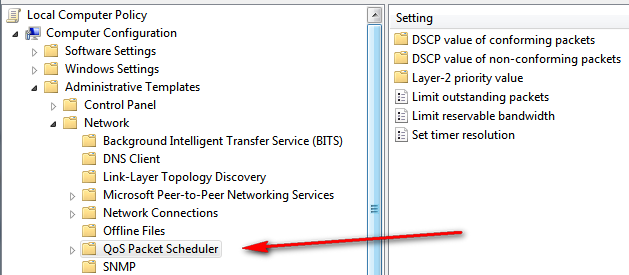
* Start > Run > type gpedit.msc
* You will see [Local Computer Policy]
* Expand the [Administrative Templates] branch
* Expand the [Network] branch
* Highlight [QoS Packet Scheduler]
* Double-click [Limit Reservable Bandwidth]
* Check [Enabled]
* Change [Bandwidth limit %] to 0 %
* Click [Apply] [OK]
* Restart


Hack BSNL Broadband for Speed (Open DNS Servers)


If you are a BSNL broadband user, chances are that you are facing frequent DNS issues. Their DNS servers are just unresponsive. The look up takes a long duration and many times just time out. The solution? There is small hack on BSNL for this. Use third party DNS servers instead of BSNL DNS servers or run your own one like djbdns. The easiest options is to use OpenDNS. Just reconfigure your network to use the following DNS servers:


Control Panel\Network and Internet\Network Connections


Right Click Bsnl Network icon--> Click Proprties --> Networking Tab
Go to Internet Protocol Version IPv4 Properties


Paste this ip addresses in DNS server

208.67.222.222
208.67.220.220

 After I reconfigured my BSNL modem to use the above 2 IP addresses, my DNS problems just vanished! Other ‘freebies’ that come with OpenDNS are phishing filters and automatic URL correction. Even if your service provider’s DNS servers are working fine, you can still use OpenDNS just for these two special features.After you hack BSNL DNS servers, you will see a noticeable improvement in your broadband speed.

Thursday, April 28, 2011

BSNL Broadband usage finder 2.4

This tool is an automated way to check BSNL Broadband (dataone) usage. This tool was initially developed when BSNL usage checking website provided only session logs and did not provide total bandwidth usage. Later upon request from users lot of features were added to program.

Some features of this tool
  • Auto login to BSNL usage checking site
  • Daily total of non free and free usage( for those having night(2am to 8am) free usage)
  • Graphic display of daily usage
  • Summary of usage, daily average used , average usable, estimated bill etc.

Download : Click here  

ShaPlus Bandwidth Meter 1.3.1 (Freeware) 
Simple to use bandwidth monitoring software to track Internet bandwidth usage. It remains in tray and displays the bandwidth usage in current session, day and month. This will be helpful for those with limited bandwidth broadband/adsl connection.

Features
  • Option to make meter always visible.
  • Transparency of meter can be adjusted.
  • Option to exclude bandwidth during certain period of day (for those having free usage periods).
  • Shortcuts to enable/disable flash and images in Internet Explorer
Download : Click here